Guide · updated 7 September 2026
Personalised job alerts that actually match your CV
By Hillel Lithwick, founder of ApexHunt · Melbourne
Most job alerts match keywords, so they bury the one relevant role under twenty irrelevant ones. ApexHunt's alerts work the other way: every morning at 8am AEST the system searches live Australian listings for your target roles and cities, scores each fresh listing against your actual CV, and emails you only when something genuinely clears the bar.
How the matching works
You set target roles and cities on your profile once. Each morning the system pulls fresh listings for those searches, discards ones you have already been sent, and scores the rest against your CV using the same match scoring the rest of ApexHunt uses. Only roles that clear a genuine match threshold make the email, ranked by score, each with the specific reasons you match and the gaps worth checking before you apply.
The honest trade: quiet mornings are real
Because the alert filters on real fit, some mornings send nothing. That is the deliberate cost of an alert you can trust: when an email does arrive, it means a role worth your attention appeared, not that a keyword matched. If your alerts have been quiet for a while, the usual cause is a target role phrased the way your employer writes it internally rather than the way other employers advertise it; your profile shows a health panel that names the problem and suggests advertised titles with real listing volume behind them.
Setting it up well
Three things make alerts work at senior level: use titles employers actually advertise ("General Manager Operations", not an internal compound title), add two or three title variants since senior Australian ads spread one discipline across several names, and keep your CV current, because the match is scored against it. From any alert email, one click saves the role into your workspace with the full match report.
How ApexHunt decides which roles to send you
Every morning ApexHunt searches live Australian listings for your target roles in your chosen cities, scores each new role against your actual CV, and emails you only the roles that clear the match threshold. The email leads with the strongest match: the role, the company, your match percentage, why you are a fit, and the one thing to add before you apply. On matches of 82% or higher it can also prepare the tailored CV and cover letter for that role and hold them for your review, so the morning the right role appears, the application is already drafted. Nothing is sent to an employer; you approve everything.
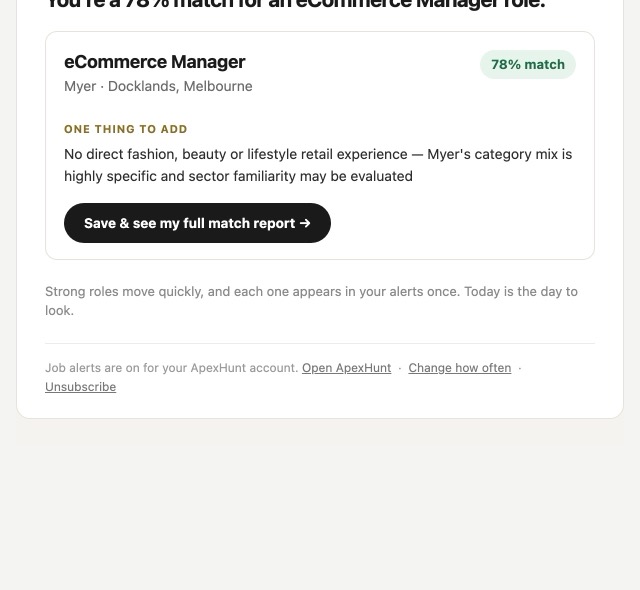
An example alert, exactly as one was sent: one eCommerce Manager role at Myer scored 78% against the recipient's CV, with the single gap worth checking named under the score. Roles under the threshold are not sent, so a quiet morning means the market was quiet for your roles.
Sources and further reading
- Australian Bureau of Statistics, Job Vacancies, Australia: The ABS counted 329,500 job vacancies in May 2026, 30% below the May 2022 peak; the series updates quarterly.
- Jobs and Skills Australia, Internet Vacancy Index: JSA's monthly count of online job ads stood at 212,200 in July 2026, which is the pool a daily alert is filtering.
Common questions
Why did no email arrive today?
Nothing fresh cleared the match bar for your roles. The check still ran; a quiet morning is the filter working. If it stays quiet for a week or more, check the alert health panel on your profile, which names the likely cause and the fix.
Are alerts free?
Yes, daily alerts are included with a free account.
How do I stop them?
One-click unsubscribe in every email, no login needed, or the switch on your profile. Turning alerts off touches nothing else in your account.