Guide · updated 8 September 2026
How to check your CV strength for free online
By Hillel Lithwick, founder of ApexHunt · Melbourne
You can check your CV's strength in under a minute without creating an account: ApexHunt's free CV check takes a pasted CV or an uploaded PDF or Word file and returns a 0 to 100 strength score with the top three findings holding it back. No card, no trial, no email address required.
The check runs in your browser. We never post or share your CV.
What the check looks at
The score reads your CV the way a screening system or a rushed recruiter does: whether your experience is stated in specific, quantified terms, whether the structure surfaces your strongest evidence early, and whether the writing carries concrete nouns (platforms, team sizes, budgets) rather than generic claims. Alongside the score you get the three specific findings most worth fixing, not a wall of feedback.
What a document score honestly cannot tell you
A strength score describes the document, not your chances on a specific role. In our published data from 212 scored senior Australian job ads, one of the two most common reasons a strong CV under-scores against a role is a named tool the candidate likely used and never wrote down, and the second is sector experience that exists but is never stated in the ad's own words. Neither shows up in a document-only check, because they depend on the ad. That is why the check's real job is to fix the document, and the decision to apply should rest on the match against the actual ad.
How to use the result
Fix the three findings first: they are ranked, and the top one usually costs the most. Then score the improved CV against a real role you want. A free ApexHunt account scores your CV against any job ad, shows the gap analysis, and includes your first tailored CV rewrite and first cover letter in full. If your document already scores high, do not keep polishing it; our before/after data shows strong documents gain little from rewording, and the useful next step is the role match.
How ApexHunt checks your CV strength
ApexHunt checks your CV strength for free online in one step: paste the text or upload a PDF or Word file and it scores the document from 0 to 100 on three things a screener notices, whether your results are quantified, whether the structure puts your strongest evidence first, and whether the writing names concrete platforms, team sizes and budgets. It then lists the three findings most worth fixing, ranked. No account is needed for the check. A free account goes further: it compares your CV against a specific job description, identifies the skill and experience gaps before you apply, and scores the tailored rewrite against the same ad so you can see the difference.
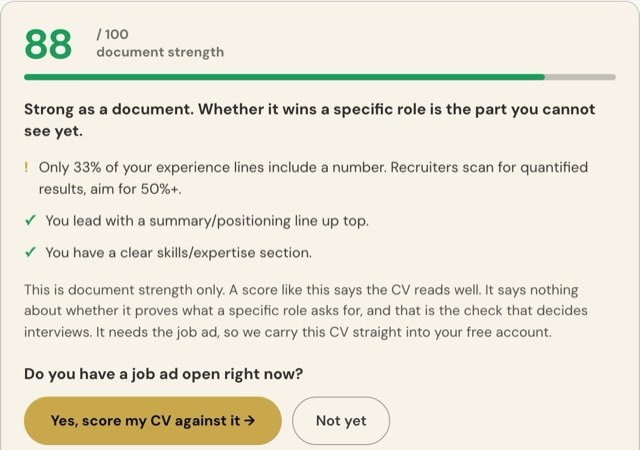
An example from a real run of the free check: a senior CV scored 88 with one finding to fix (a third of its experience lines carried a number) and two passes. The next step it offers is the role match, which needs the job ad.
Sources and further reading
- University of Sydney Careers, How to write a resume: The university's careers service advises one to three pages for most industries and quantified outcomes wherever possible, the same two things the free check scores.
- Mercy University Career and Professional Development: Eye-tracking research puts a recruiter's first pass at about seven seconds, which is why the check weights what sits at the top of the page.
Common questions
Is the check really free?
Yes. The instant check needs no account and no card. A free account adds the role-match scoring, and stays free: no trial period and nothing that expires.
What happens to my CV?
The check runs on the page you are on. Your CV is not posted anywhere public and is not shared; nobody sees it except the infrastructure providers that run the service.
What score should I aim for?
Treat under 70 as a document with fixable writing problems, 70 to 84 as solid, and 85 plus as strong. Whatever the number, the next question is the same: does this CV prove the specific role you want next? That needs the job ad.